
Remember that feeling of wanting to freeze a perfect travel moment? For me, time-lapse videos became the answer – and a life-changer. Discover how this simple technique revolutionized my adventures, turning fleeting views into timeless stories and deepening my connection to the world. ---
Travel Time-Lapse Magic: How Capturing Fleeting Moments Changed My Life Forever
The sun was a molten orb dipping into the Aegean Sea, painting the iconic white-washed villages of Santorini in hues of orange, pink, and purple. I stood there, mesmerized, trying desperately to imprint every second onto my memory. My phone, inadequate as it felt, captured a blurry panoramic, but it couldn't convey the passage of that breathtaking moment, the way the light softened, the shadows lengthened, and the sky exploded in a symphony of colors before fading to twilight.
That evening, sipping local wine, I felt a familiar pang of regret. How could I truly share this magic? How could I relive the slow, deliberate dance of the sun? It was a feeling I'd experienced countless times – watching the bustling markets of Marrakech come alive, observing the relentless flow of traffic in Tokyo, or witnessing the ethereal dance of the Northern Lights in Iceland. My photos were snapshots; my videos were often shaky and missed the bigger picture.
It was during a solo trip through Southeast Asia, specifically perched on a rooftop bar overlooking Bangkok’s chaotic yet captivating skyline, that the revelation hit me. I saw someone with a small camera diligently set up on a tripod, patiently waiting. They weren't just taking photos; they were capturing time. That night, I stumbled down a rabbit hole of YouTube tutorials and travel blogs, discovering the art of time-lapse photography.
What started as a technical challenge quickly transformed into a profound shift in how I experienced travel. It forced me to slow down, to observe, to be truly present. It turned fleeting moments into cinematic masterpieces I could cherish and share. It didn't just change my travel videos; it changed me. And today, I'm here to share my journey, my tips, and how you, too, can unlock this incredible storytelling power.
1. The "Why" – More Than Just a Pretty Video: The Soul of Time-Lapse
Before we dive into f-stops and intervals, let's talk about why time-lapse is so incredibly impactful for a traveler. It's not just about making a cool video; it's about telling a story that static photos or real-time videos simply can't.
Imagine standing at the edge of the Grand Canyon. A photograph captures its immense scale. A video might show the wind whistling through the rocks. But a time-lapse? It reveals the imperceptible shift of shadows across the canyon walls, the slow crawl of clouds casting moving patterns, the transformation from a fiery sunrise to a golden afternoon, all condensed into a few breathtaking seconds.
For me, time-lapse became a way to capture the uncapturable. How do you show the pulse of a city like Hanoi, where scooters swarm like bees and street vendors create a symphony of sounds and smells? A time-lapse of a busy intersection, condensing hours into moments, perfectly illustrates that vibrant chaos. Or consider the serene beauty of a glacier in Patagonia – a time-lapse can subtly hint at its slow, majestic movement, a poignant reminder of nature's power and fragility.
It’s storytelling with a unique rhythm. It allows you to convey the passage of time, the evolution of a scene, and the emotional resonance of a place in a way that feels almost magical. It's about seeing the world through a different lens, literally, and sharing that deeper perspective with others. It turned my travel memories from a collection of snapshots into dynamic narratives.
2. Gear Up! My Essential Time-Lapse Kit (No Need to Break the Bank)
When I first started, I thought I needed a professional film crew's worth of equipment. Turns out, you can achieve incredible results with surprisingly modest gear. Here’s my go-to kit, balancing quality with travel-friendly practicality:
- The Camera:
- DSLR/Mirrorless (My Choice): I mostly use my Sony A7III (or similar models like Canon EOS R, Nikon Z6). These offer excellent image quality, manual controls, and often built-in intervalometers. You can find older models like a Canon 5D Mark III or Nikon D750 for a great price on the used market (around $800-1200) that are still fantastic.
- Action Cam (GoPro Hero 10/11): Incredibly versatile, rugged, and compact. Great for active shots, underwater, or extreme weather. Many GoPros have dedicated time-lapse modes. They're usually in the $250-400 range.
- Smartphone (iPhone 14 Pro, Pixel 7 Pro): Don't underestimate your phone! Modern smartphones have excellent cameras and built-in time-lapse features. While less control than a dedicated camera, they're perfect for starting out and capturing casual sequences. Plus, you already own it!
- The Non-Negotiable – A Sturdy Tripod:
- This is arguably more important than your camera. Any movement, even a slight wobble, will ruin your time-lapse.
- My Recommendation: A lightweight, travel-friendly carbon fiber tripod. I swear by my Peak Design Travel Tripod ($350) – it's compact, stable, and quick to set up. More budget-friendly options like the Manfrotto BeFree Advanced (around $150-200) or K&F Concept tripods (around $100) are also excellent choices. Ensure it has a hook for hanging your backpack for extra stability in windy conditions.
- The Intervalometer:
- This little device tells your camera to take a photo at specific intervals. Many modern DSLRs/Mirrorless cameras have a built-in intervalometer (check your camera's menu!).
- If yours doesn't, an external wired or wireless intervalometer (like a Vello ShutterBoss for $20-50) is essential. Make sure it's compatible with your camera model.
- Power, Power, Power:
- Time-lapses consume battery life like crazy. Always carry at least 2-3 spare camera batteries.
- A high-capacity power bank (like an Anker 20000mAh for $40-60) is a lifesaver, especially for charging your phone, GoPro, or even powering certain mirrorless cameras directly via USB-C for extended shoots.
- Storage:
- You'll be taking hundreds, if not thousands, of photos. Invest in large, fast SD cards (e.g., SanDisk Extreme Pro 128GB or 256GB for $25-50). RAW files eat up space quickly!
- Optional Enhancements:
- ND Filters (Neutral Density): Like sunglasses for your camera. Essential for shooting long exposures during bright daylight (e.g., silky water time-lapses) or achieving cinematic motion blur. A variable ND filter (e.g., K&F Concept Variable ND2-400 for $50-100) is versatile.
- Motion Control Slider: For advanced users, a motorized slider (e.g., Syrp Genie Mini II for $200-300 or a full slider kit for $500+) adds dynamic movement to your time-lapses, creating stunning hyperlapses or moving shots. I started with this much later, but it's a game-changer for cinematic quality.
Remember, you don't need everything at once. Start with your phone and a basic tripod, then gradually upgrade as your passion grows. My first real time-lapse was shot with a borrowed entry-level DSLR and a cheap tripod – and it was still thrilling!
3. Mastering the Art – Settings & Techniques for Stunning Shots
This is where the magic truly happens. Getting your settings right is crucial to avoid flickering, inconsistent exposure, and blurry shots.
- Choosing Your Subject Wisely:
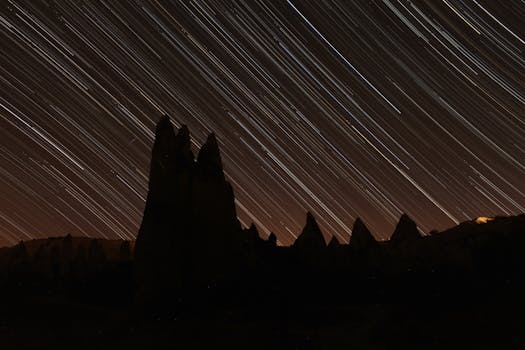
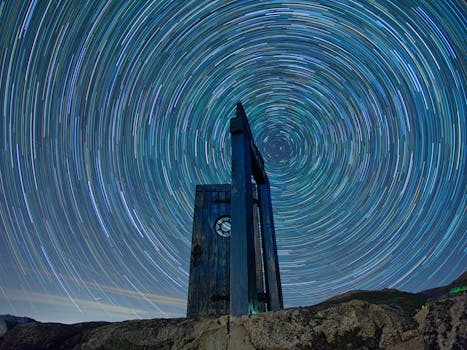
- Nature: Sunrises/sunsets, moving clouds, starry nights/Milky Way, blossoming flowers, flowing rivers/waterfalls (with ND filters).
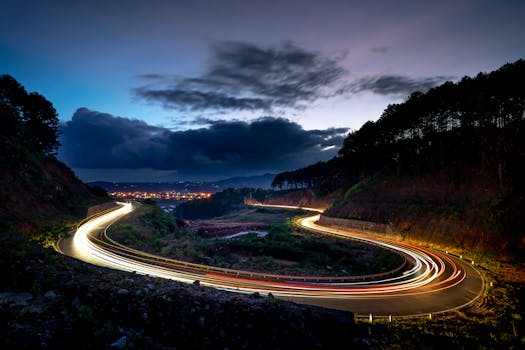
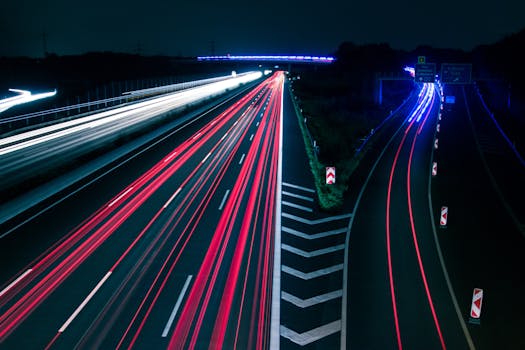
- Cityscapes: Bustling streets, traffic patterns, city lights at dusk, construction, people moving through public spaces, building reflections.
- Events: Festivals, markets, concerts, crowds gathering.
- My absolute favorite? Capturing the transition from blue hour to golden hour over a vibrant city like Kuala Lumpur from a high-rise balcony. Pure magic.
- Camera Settings (Manual Mode is King!):
- Exposure (M Mode): This is non-negotiable. Set your ISO, Aperture (f-stop), and Shutter Speed manually. If you use automatic settings, your camera will constantly adjust, leading to a "flickering" effect in your final video.
- Aperture: Start around f/8 for good depth of field.
- ISO: Keep it as low as possible (e.g., ISO 100-400) for clean images, especially during the day. For astrophotography time-lapses, you'll need higher ISO (e.g., ISO 1600-6400).
- Shutter Speed: This depends on your desired motion blur. For a "silky" look (like moving water or clouds), use a slightly longer shutter speed (e.g., 1/2 second to 2 seconds). For crisp, distinct frames, use a faster shutter speed (e.g., 1/100 to 1/250 second).
- White Balance (Manual): Set it manually (e.g., "Daylight," "Cloudy," or a specific Kelvin temperature). Auto White Balance will cause color shifts.
- Focus (Manual): Auto-focus will hunt and potentially refocus between shots. Set your focus manually to your subject (or infinity for landscapes) and then switch to manual focus. I learned this the hard way after an hour-long shoot of a stunning sunset over the Cliffs of Moher, only to find half the frames out of focus!
- RAW vs. JPEG: Always shoot in RAW. It gives you maximum flexibility in post-processing to adjust exposure, colors, and shadows without losing quality. Yes, it takes more space, but it's worth it.
- The Interval – How Long Between Shots?
- This determines the speed of motion in your final video.
- Fast Motion (Clouds, Crowds, Traffic): 1-5 seconds
- Medium Motion (Sunrises/Sunsets, City Activity): 5-10 seconds
- Slow Motion (Stars, Construction, Long Events): 15-30 seconds
- Calculate Total Shots: A typical video runs at 24 or 30 frames per second (fps). If you want a 10-second video at 24fps, you need 240 frames. If your interval is 5 seconds, the total shooting time will be 240 frames 5 seconds = 1200 seconds (20 minutes). Plan accordingly!
- Placement & Stability:
- Find a stable, secure spot. Avoid areas with heavy foot traffic or strong wind.
- Level your tripod. Use sandbags or hang your backpack from the center column for extra stability.
- Frame your shot carefully. Use the rule of thirds, leading lines, and consider foreground elements.
- Personal mishap: Once, while shooting a beautiful sunrise over the temples of Bagan in Myanmar, a rogue gust of wind almost toppled my tripod. Luckily, I had my backpack hanging from it, saving my camera (and my sanity!). Always be aware of your surroundings!
- Hyperlapse (The Walking Time-Lapse):
- This is an advanced technique where you physically move your camera between shots. It creates a dynamic, flowing time-lapse.
- Technique: Choose a fixed point of interest (e.g., a monument, a building corner). Take a photo, move a small, consistent distance forward (e.g., 1-2 steps), re-frame your subject to the exact same spot in your viewfinder, and take another photo. Repeat. It's tedious but incredibly rewarding! I experimented with this walking through the bustling markets of Delhi, and the result was mesmerizing.
4. The Post-Production Magic – Bringing Your Frames to Life
This is where your thousands of individual frames transform into a smooth, captivating video. Don't be intimidated; it's a logical workflow.
- Essential Software:
- Adobe Lightroom Classic: For batch editing your RAW photos. (Subscription: $9.99/month for Photography Plan)
- LRTimelapse: Absolutely essential for deflickering and handling exposure ramps (e.g., day-to-night transitions). It integrates seamlessly with Lightroom. (Free version for up to 400 frames, Pro version $100+)
- Adobe Premiere Pro / After Effects: For assembling your video sequence, adding music, titles, and final color grading. (Included in Photography Plan or separate subscription)
- DaVinci Resolve: A professional-grade video editing suite with excellent color grading, and a powerful free version!
- My Workflow (Simplified):
- Import & Select: Transfer all your RAW frames to your computer.
- Lightroom Batch Edit:
- Open your photos in Lightroom.
- Select the first (or a representative) frame and make your initial adjustments: exposure, highlights, shadows, white balance, contrast, saturation, sharpening. Think about the overall look you want.
- Crucially: Sync these adjustments to all your other frames. This ensures consistency.
- If you're doing a day-to-night transition, LRTimelapse will help you create keyframes in Lightroom to smoothly ramp exposure changes.
- Deflickering (LRTimelapse is Your Friend):
- This is CRITICAL. Even with manual settings, slight variations in light can cause your final video to "flicker."
- LRTimelapse analyzes your sequence and generates a smooth transition between frames, eliminating flicker. It’s a lifesaver.
- Export from Lightroom/LRTimelapse:
- Export your adjusted frames as high-quality JPEGs (e.g., 100% quality) or a video sequence (ProRes or H.264).
- Assemble in Video Editor (Premiere Pro/DaVinci Resolve):
- Import your image sequence (the folder of JPEGs). Your editor will recognize it as a video.
- Set your sequence frame rate (24 or 30 fps).
- Add transitions, titles, and any other effects.
- Music: This is where your time-lapse truly comes alive. Find royalty-free music that matches the mood and pace of your video. I use services like Artlist or Epidemic Sound (subscriptions around $15-30/month) for their vast libraries. The right soundtrack can elevate an ordinary time-lapse into an emotional experience.
- Anecdote: I once spent hours trying to manually deflicker a sunset time-lapse from Bali in Premiere Pro, frame by agonizing frame. It was a nightmare. Discovering LRTimelapse was like finding a magic wand. Seriously, don't skip it!
5. Beyond the Horizon – My Life-Changing Moments & Takeaways
This isn't just about technical skills; it's about a shift in perspective. The "life-changing" aspect of time-lapse photography isn't an exaggeration for me.
- Deeper Observation & Presence: When you set up a time-lapse, you're committed to that spot for an extended period. You can't just snap a photo and move on. You're forced to slow down. While waiting for my camera to click away at Angkor Wat, I wasn't rushing to the next temple. I sat, watched the monks walk by, listened to the jungle awaken, and noticed the intricate details of the carvings as the morning light hit them. The world truly slows down around you. This deep immersion has enriched my travel experiences immeasurably.
- Patience, Resilience, and Problem-Solving: Time-lapses often go wrong. Batteries die, cards fill up, weather changes, people walk in front of your shot, or you forget to set manual focus (guilty!). It teaches you patience, how to troubleshoot on the fly, and the resilience to try again. That perfect shot of the stars over the Sahara Desert? It took three nights of trial and error, battling sand, cold, and exhaustion, but the final video was worth every struggle.
- Unlocking New Stories & Connections: My time-lapses became a powerful way to share my adventures. They resonated with people because they offered a unique perspective. I've had strangers approach me while shooting, curious about what I was doing, leading to unexpected conversations and friendships. It's also opened doors to collaborations with travel brands and local tourism boards who loved the cinematic quality of the videos.
- Enhanced Memory & Reliving Moments: Photos capture a moment, but a time-lapse captures an event. Watching a time-lapse of a bustling market in Chiang Mai, I don't just see the stalls; I feel the energy, the flow of people, the passage of time, almost as if I'm back there. It's a more immersive, emotional way to relive cherished memories.
- A New Appreciation for the Fleeting: The essence of time-lapse is capturing change over time. This practice has made me more aware of the subtle, beautiful changes happening around me constantly – the way light shifts, clouds move, or cities breathe. It cultivates a profound appreciation for the ephemeral beauty of life and travel.
Ready to Capture Your Own Magic?
From the first shaky sunset time-lapse I ever made to the intricate hyperlapses I craft today, this journey has been nothing short of transformative. It has taught me to see the world differently, to appreciate the beauty in slow transitions, and to tell stories with a depth I never thought possible.
You don't need to be a professional filmmaker or own the most expensive gear to start. Grab your smartphone, find a stable surface, and experiment with its built-in time-lapse mode. Or, if you have a camera, dust off that tripod and dive into manual settings. The biggest hurdle is simply starting.
Find a beautiful sunrise, a bustling street, or a captivating cloud formation. Set up your camera, press record, and let time unfold before your lens. You'll not only capture incredible visuals, but you'll also discover a deeper connection to your surroundings and a newfound appreciation for the art of observation.
So, what are you waiting for? Grab your camera, find your moment, and start capturing the magic! Share your first time-lapse with us on Instagram using #TripsoraTimeLapse – we can't wait to see your world unfold!
---
More pictures
Tags
Share this guide
We may earn a commission if you click a link and buy a product or service, at no extra cost to you. How affiliate links work.
Been there?